
Look on the back or underside of your shaver’s handle for the model number. Switch it off and copy the full code, including letters and any digits after a slash or hyphen. The number on a replacement head identifies the part, not the handle.
Braun Series 7 and Philips OneBlade are family names, not complete model numbers. For a parts search, use a handle code such as Braun 9340s or Philips QP2520/20. Keep any separately labelled type number for manufacturer support; do not enter your serial number in the part finder.
Model, type and serial numbers
If the handle carries several numbers, record the labels beside them. The model and type numbers help identify the product; the serial number belongs to your individual appliance. Keeping those labels with the numbers makes it easier to use a support form or ask for help.
Which number should you search?
Start with the code on the shaver itself. A replacement-head reference can help you browse a part family, but it does not identify every handle that fits. These are examples of code formats, not a compatibility table.
| Marking | Example | How to use it |
|---|---|---|
| Handle model | Braun 9340s | Search the model, keeping any letters. Record the type number separately if present. |
| Handle model | Philips QP2520/20 | Keep the digits after the slash when checking the local product page. |
| Handle model | Panasonic ES-LT2A | Keep the ES prefix and the remaining letters and digits. |
| Replacement reference | 94M, SH71/52 or WES9032P | Browse the part reference, then verify your handle in the manufacturer information. |
| Serial number | The individual appliance identifier | Use it for manufacturer support when requested; it is not a replacement-part reference. |
Reading small or worn markings
A close-up photograph can make small lettering easier to read. Adjust the angle to reduce reflections, then enlarge the image. Compare unclear characters with the marking on the handle, particularly a zero and the letter O.
The Panasonic handle pictured here shows its model code at the top of the rear label, near the base of the handle. The position varies between devices. There is no need to open the housing to look for it.
If the label is missing
The original box, receipt or product-registration email may contain the model code. Compare any reference you find with the manufacturer’s product page to confirm that the document belongs to the shaver you have.
If identification remains uncertain, send the manufacturer clear photographs of the front, back and head attachment. Once the model is identified, its support information can provide the replacement-part reference to use when shopping.
Use the code to check a replacement
Enter the full handle code in the part finder. If it returns a model guide, compare the recorded model, market and replacement reference with your own device and manual. A similar-looking code is not an exact match.
If there is no result, check the spelling and try the manufacturer support page. An unlisted model means our catalogue does not establish the match. Do not drop a regional suffix or choose a neighbouring model just to get a result.
Keep this identification checklist with your shaver
Record these details before you discard a box or contact a repairer. Copy every letter, slash and suffix exactly as printed; use a clear label photograph when a character is difficult to read.
| Detail | What to record |
|---|---|
| Handle | Brand and complete printed model code, including suffix. |
| Existing part or replacement pack | Complete reference and whether the pack contains a head, foil, cutters, frame or accessory. |
| Cleaning station, if relevant | Its own model or type and the refill reference. |
| Market | Country where the device was purchased; retain the local manufacturer manual. |
| Evidence to share | Label photographs and the relevant manufacturer manual or support page. |
Have the code? Find its replacement
Where’s my model number?
Use the complete model number from the handle, underside label or rating plate.
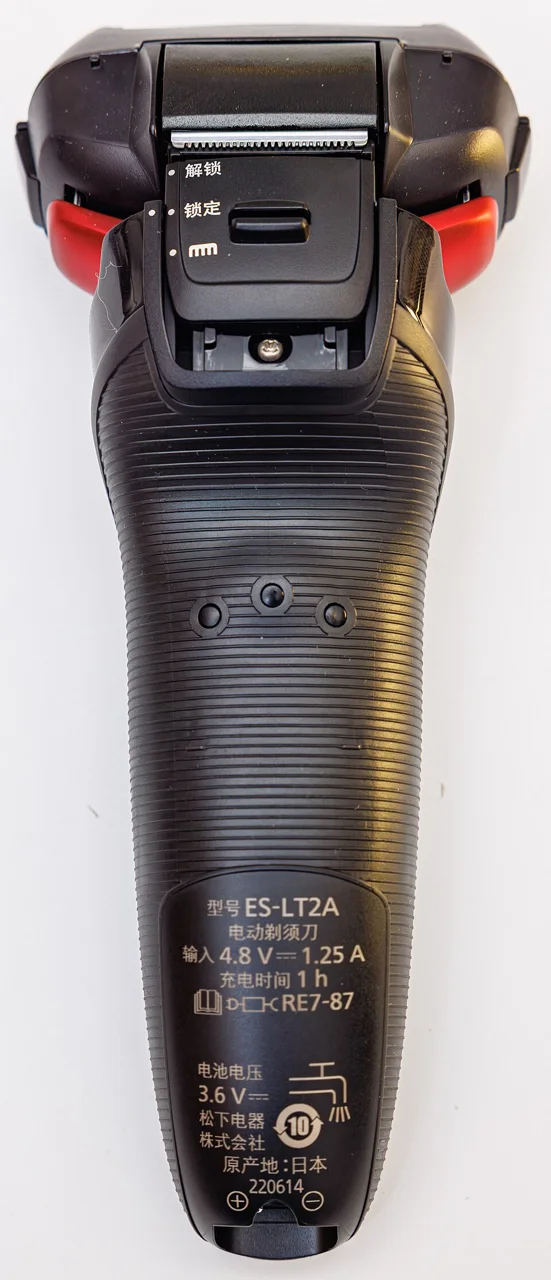
Photo credit & source
Original photograph · Orientation normalized, resized within 1280 × 1280 pixels and converted to WebP; no crop. Original reuse terms retained.
Browse Manscaped replacement parts, Remington replacement parts, Gamma+ replacement parts, Laifen replacement parts, StyleCraft replacement parts, Xiaomi replacement parts, Hitachi replacement parts, IZUMI replacement parts, Beurer replacement parts, Eltron replacement parts, Grundig replacement parts, Guard Grooming replacement parts, SilverCrest replacement parts, TRANSFORM-U replacement parts for part references and model lists.
Check replacement references
| Reference guide | What to check |
|---|---|
| Braun 32B: check Series 3 model codes | Have a 32B head reference? Compare the full handle code in the model list; the Series 3 name alone does not establish fit. |
| Philips Norelco SH71/52: check the full pack code | Keep the /52 pack suffix and the full shaver code. SH71/50 is a different regional reference. |
| Panasonic WES9032P: foil, blades or complete set | Distinguish the WES9032 set, WES9173P foil and WES9170P blades, then check the handle model. |